This fixed reference supplies the phone performance and comic reaction. Your uploaded image supplies the main character’s appearance.
History
Video history
Loading history…
A character study in comic disbelief
Build a small performance around a very large expectation. The ChatGPT Millionaire page on aigenjutsu.com uses one appearance image and a fixed video reference to create a comedy remake. Start with a visible face and let the reaction carry the scene.
You supply the main character’s image; the page provides the motion direction. The millionaire question belongs to the comic premise and does not offer financial advice or a real outcome. Review the reference and current credit quote before generating.
Use an unobstructed face as the appearance anchor.
How to create your ChatGPT Millionaire remake
1. Define the character’s expression range
Choose a portrait with a calm or lightly attentive face. A permanent exaggerated grimace can make subtle changes harder to read. Keep the subject alone, with the eyes unobstructed and enough space around the head.
2. Study the reference performance
Play the supplied video and notice the changes in gaze, phone position and posture. Those movements form the preset. A different source portrait can change the personality, but it does not select a different action sequence.
3. Upload one appearance image
Add the portrait to the main-character slot. Check the output options and the quote shown by the form. The page includes the reference video, so you do not need to write a shot-by-shot performance prompt or upload more footage.
4. Watch the transition between moods
When the task is ready, use History to watch the full clip. Compare the face before and after the reaction, then inspect the hands around the phone. Save a result only after the change of mood makes sense.
Keep facial landmarks visible
Choose one clear view for the actual upload.
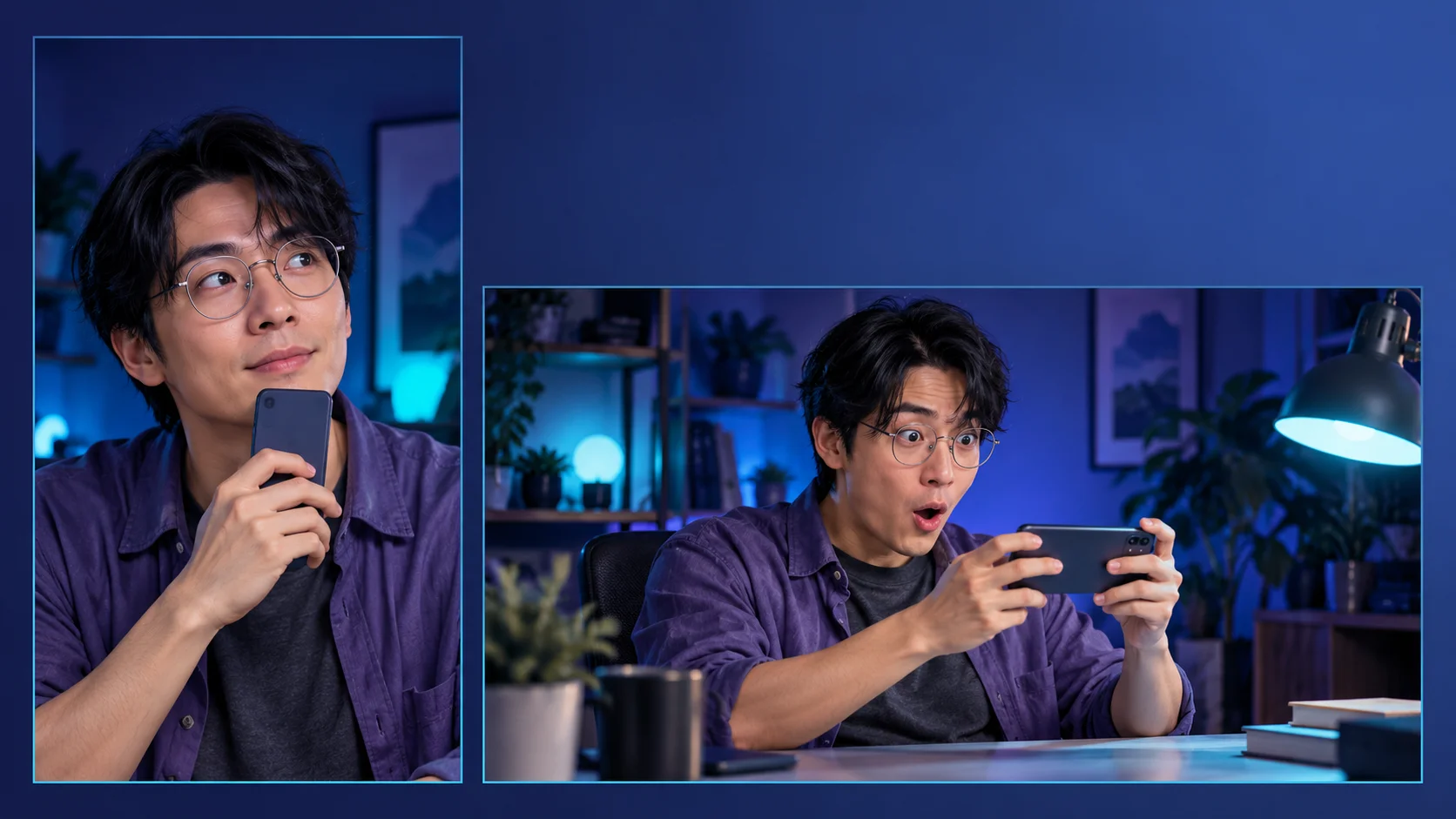
The violet-overshirt study uses a simple pose and controlled lighting. Its glasses remain clear of the eyes, and the mouth is not hidden behind a phone. That is a practical direction for a source portrait: recognizable features matter more than a dramatic background.
The preparation board compares views rather than adding extra required inputs. Pick one strong image for the upload. Side views, shadows or clutter can make the subject more difficult to interpret, and a cleaner source still does not guarantee perfect identity preservation.
Give the reaction a readable middle
Look for a coherent transition between the three moods.
Our expression sequence moves from self-assurance to a processing pause and then amused disbelief. Use that as a viewing checklist. The video reference, not this illustration, supplies the actual movement and setting used by this page.
If a result seems abrupt, inspect the transition instead of judging only the final face. Watch for glasses changing shape, a phone crossing the mouth or fingers merging. A small consistent performance can be more effective than an extreme expression with distracting artifacts.
Frame the face and the gesture together
Keep both the face and the phone gesture inside the crop.
The phone gesture helps explain what the character is responding to. Keep it in view alongside the face when you choose a crop. The tall and wide composition studies show how empty space can leave room for a caption without hiding the expression.
The source image’s studio lighting is an appearance-planning choice, not a guarantee that the video will take place in that studio. Review the finished scene and any generated audio before adding context or sharing it. Exact wording and voice reproduction are not promised.
Input, cost and result questions
Does this require acting or filming?
No filmed performance is required from you. Add one portrait and use the page’s supplied reference. The output is a generated remake, so the result still needs review.
Can I choose a different ending?
This page follows a fixed reference. It has no independent ending selector. Use another video workflow when you want to develop a different scene rather than this reaction format.
Is the millionaire premise a real claim?
It is an exaggerated comedy setup. The page creates entertainment imagery and provides neither a financial recommendation nor a promise of becoming wealthy.
Is a free generation included?
The available access depends on your account and the model’s current policy. Check the live form and Pricing; this guide does not promise a free trial or unlimited use.
Where do I see cost and progress?
The form shows the credit estimate for your selected settings before generation. After submission, follow the task status and History. Queue time can vary, so no fixed completion time is stated here.
What should I check in the result?
Review likeness, glasses, fingers, phone position and the change in expression. Listen to any audio as well. Exact dialogue and perfectly stable details are not guaranteed.